The Case for Standardizing the Design of Websites

Featured

People complain that websites are all starting to look the same.

They are not entirely wrong. A lot of modern websites do look similar. They have familiar navigation bars, predictable layouts, large hero sections, cards, sidebars, dashboards, tabs, search boxes, profile menus, settings pages, and responsive grids. Buttons look like buttons. Forms look like forms. Menus behave like menus.

But I would argue that this is mostly a good thing.

Software is supposed to feel familiar.

A website is not a painting. It is not a sculpture. It is not a brand mood board. At least not primarily. A website is usually a tool that someone is trying to use to accomplish something. They want to read, buy, search, compare, book, configure, publish, message, upload, download, schedule, manage, or solve a problem.

And when people are trying to get something done, originality is not always a virtue.

Familiarity Is a Feature

Jakob's Law says:

Users spend most of their time on other sites. This means that users prefer your site to work the same way as all the other sites they already know.

That one idea explains a huge amount of good interface design.

Users do not arrive at your website as blank slates. They bring expectations from every other website and app they have used. They expect the logo to link home. They expect navigation to be near the top or side. They expect search to look like search. They expect account settings under an avatar or profile menu. They expect destructive actions to require confirmation. They expect forms to validate in familiar ways. They expect mobile navigation to collapse into a menu.

When your site follows those expectations, users can spend their mental energy on the task instead of the interface.

That is the point.

Good design reduces cognitive load. It does not force users to relearn basic interaction patterns just because a company wanted to look different.

Different Is Not Automatically Better

There is a common mistake in web design: confusing distinctiveness with quality.

A site can be visually unique and still be frustrating to use. It can be memorable for all the wrong reasons. It can win design awards while annoying the actual people who need to navigate it.

Novelty has a cost. Every unusual layout, hidden interaction, custom scroll behavior, strange menu, or clever visual metaphor asks the user to stop and figure out what is going on.

Sometimes that cost is worth paying. Most of the time, it is not.

If you are building a portfolio, an art project, a game, an interactive story, or a highly expressive brand experience, originality may be the product. In those cases, the interface itself is part of the message.

But most websites are not that.

Most websites are closer to software. They exist to help users do something. And software benefits from conventions.

Nobody complains that every desktop app has menus, windows, buttons, scrollbars, keyboard shortcuts, and settings screens. Nobody wants each text editor to invent a new way to save a file. Nobody wants every checkout flow to completely reinvent how payment forms work.

We understand this in software. We should understand it on the web too.

The Early Web Was More Like a Brochure

Part of the reason people expect websites to look different is historical.

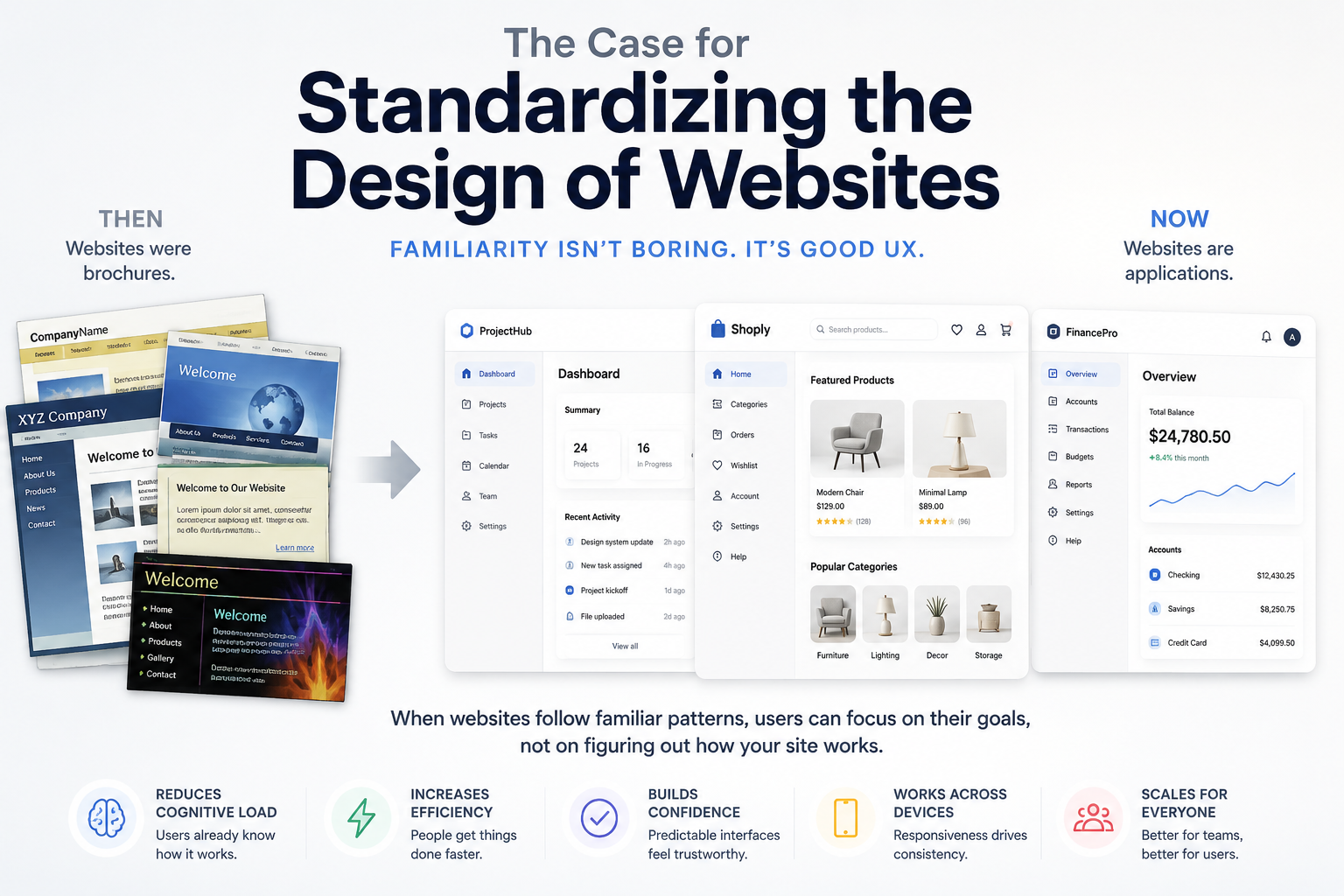
In the early days of the web, most websites were not really applications. They had very little functionality. A company website was often a digital brochure: a homepage, an about page, a contact page, maybe a product page, maybe some animated graphics, maybe a guestbook if things got wild.

The web was a publishing medium first. It was closer to a magazine rack than an app store.

So companies treated websites like marketing materials. The goal was to express the brand. Be memorable. Look different. Show personality. Stand out from competitors.

That made sense at the time.

But the web changed.

Today, websites are often full applications. Banking, email, project management, analytics, design tools, developer tools, ecommerce, healthcare portals, tax software, maps, calendars, document editors, CRMs, dashboards, admin panels, and social platforms all run in the browser.

From a user experience standpoint, these things should not behave like brochures. They should behave like software.

And software works best when users can transfer knowledge from one tool to another.

Standardization Helps Users Move Faster

When websites share common design patterns, users get faster.

They know where to look. They know what to click. They know what will happen next. They can predict the system. That predictability creates confidence.

This is especially important for functional websites. A developer using an API dashboard does not want to decode an experimental interface. A shopper checking out does not want to hunt for the cart. A patient using a medical portal does not want a creative navigation system. A small business owner using accounting software does not want the invoice editor to be a visual puzzle.

They want clarity.

Standard layouts are not lazy. They are respectful.

They tell the user, "You already know how this works."

That is powerful.

Responsiveness Pushes Designs Toward Similarity

There is another practical reason websites are starting to look alike: responsive design.

A modern website has to work on large desktop monitors, laptops, tablets, foldables, and phones. It has to handle different screen widths, input methods, font sizes, accessibility settings, and network conditions.

That naturally pushes designers toward patterns that survive across contexts.

A three-column desktop layout becomes a single-column mobile layout. Navigation collapses. Cards stack. Tables become lists. Buttons become full-width. Sidebars move behind menus. Content is broken into modular sections. Interfaces become more grid-based and component-driven.

Once you design for responsiveness, some choices become obvious because they are durable.

Cards are popular because they adapt well. Navigation bars are popular because users understand them. Responsive grids are popular because they scale. Reusable components are popular because they keep interfaces consistent across pages and devices.

The more screens a site has to support, the more valuable consistency becomes.

A wildly unique desktop design may look impressive in a mockup. Then it falls apart on a phone.

Design Systems Are a Sign of Maturity

The rise of design systems also contributes to this similarity.

That is not a bad thing.

Design systems exist because teams eventually learn that inventing every screen from scratch is a waste of time. It creates inconsistency, slows development, increases bugs, and makes products harder to maintain.

A good design system gives teams a shared language: buttons, forms, modals, alerts, cards, tables, menus, typography, spacing, colors, and interaction rules. Instead of debating every detail on every page, teams can focus on the actual product.

This is how mature software gets built.

Developers already understand this idea. We reuse libraries, frameworks, components, APIs, database conventions, command-line patterns, and project structures. We do not write everything from scratch just to prove we are creative.

Interface design should be treated the same way.

Consistency is not the enemy of creativity. It is what lets creativity be spent where it matters.

Branding Still Matters

None of this means every website should be identical.

Branding still matters. Personality still matters. Visual polish still matters. Tone, illustration, motion, color, copy, imagery, and small interaction details can all make a site feel distinct.

But those things should sit on top of a usable foundation.

A brand should not make the navigation confusing. It should not make forms harder to complete. It should not hide important actions. It should not replace clear labels with clever language. It should not force users to learn a brand-new interface model for no good reason.

The best websites are familiar in structure and distinct in character.

They work the way users expect, but still feel like they belong to a specific company or product.

That is the balance.

Standardization Is Not Boring. It Is Useful.

A lot of complaints about websites looking the same come from people who spend a lot of time looking at websites as objects.

Designers look at websites. Developers look at websites. Marketers look at websites. Founders look at competitors' websites. We notice patterns. We get bored. We want something fresh.

But users are not usually studying websites as creative artifacts.

They are trying to get something done.

For them, sameness can be a relief. Familiarity means less thinking, fewer mistakes, faster decisions, and lower frustration.

That is not boring. That is good design.

The web has grown up. Websites are no longer just digital brochures. They are tools, workspaces, stores, dashboards, editors, communication systems, and applications.

And applications should be predictable.

So yes, many websites are starting to look the same.

Good.

That means the web is slowly learning what software has known all along: users do not want every tool to be a new adventure. They want it to work.

Git Belongs in More Developer Tools

Featured

Developers already have a collaboration system that works.

It is called git.

That sounds obvious, but a surprising number of developer tools still behave like git does not exist. They store important project data in private clouds, opaque workspaces, proprietary databases, or giant export files that nobody wants to diff. Then they bolt on “team sharing” later as a paid feature, usually with invites, roles, seats, syncing, workspaces, and some new mental model developers have to learn.

But developers already know how to collaborate.

We branch. We commit. We review. We merge. We revert. We blame. We tag releases. We keep history. We argue in pull requests. We use the same workflow for application code, infrastructure, documentation, migrations, tests, CI configuration, and deployment scripts.

So why not more of our tools?

Project Data Is Still Source Code

A lot of developer tooling produces data that is not technically “code,” but still behaves like source.

API collections are a good example. They describe real parts of a system: endpoints, headers, authentication, examples, request bodies, environments, scripts, and workflows. That information changes as the application changes. It has history. It has ownership. It benefits from review.

The same is true for database schemas, OpenAPI definitions, deployment configs, seed data, mocks, test cases, local development settings, and automation rules.

When those things live outside git, they become harder to trust.

You end up asking questions like:

  • Who changed this?
  • When did it change?
  • Why did it change?
  • Can I compare this to production?
  • Can I roll it back?
  • Can I review it before the team starts depending on it?

Git already answers those questions.

Export Files Are Not a Workflow

A common workaround is export/import.

Export the thing. Commit the exported file. Tell your teammate to import it. Hope they do not overwrite their local copy. Hope the next export does not reorder everything and create a useless diff. Hope nobody forgets which copy is the current one.

That is better than nothing, but it is not a real workflow. It is a side channel.

Export/import works fine for snapshots. It does not work well for living project data.

A real workflow should let the tool write structured files as you work. Changes should be reviewable. Small edits should produce small diffs. Teams should be able to branch, commit, pull, push, and merge without treating the developer tool as a separate universe.

That is the key distinction: git should not be an afterthought. It should be part of the tool’s storage model.

Developers Do Not Need Another Collaboration Model

A lot of modern tools try to own collaboration.

They create accounts. They create teams. They create workspaces. They create invite flows. They create permissions. They create billing tiers. They create a cloud sync layer. Then they ask developers to move their project knowledge into that system.

Sometimes that makes sense. Real-time collaboration is useful. Hosted services are useful. A shared cloud backend can be the right answer.

But it should not be the only answer.

For many teams, the repository is already the source of truth. Access control already exists there. Review already exists there. History already exists there. CI already exists there. If the data belongs to the project, putting it in the project repository is usually the least surprising thing to do.

That does not mean every tool needs to become a git client. It means more tools should respect git as a first-class place where developers keep important work.

Good Git Integration Is More Than “Save as JSON”

There is a lazy version of git support: dump one huge JSON file into a folder and call it a day.

That is not good enough.

If every change rewrites a giant blob, diffs become noisy. Merge conflicts become painful. Code review becomes nearly useless. Developers technically have the data in git, but they do not get the full benefit of git.

Good git-backed tooling should produce files that are meant to be read, reviewed, and merged.

That means:

  • stable formatting
  • predictable file names
  • small files for small units of work
  • local-only secrets kept out of commits
  • shared configuration separated from private overrides
  • sensible conflict behavior
  • no pointless churn when nothing meaningful changed

The goal is not just to store data in a repository. The goal is to make the repository useful.

HarborClient Now Supports Git

This is one reason I like the direction HarborClient is taking.

HarborClient now supports git-backed collections, which means requests, environments, and collection metadata can live as files in a repository instead of being trapped inside an app database or passed around as exports. Git is treated as a first-class database provider alongside options like SQLite, MySQL, PostgreSQL, and Firestore. Collections are written to disk as structured JSON while you work. Each saved request gets its own file, which keeps diffs smaller and merge conflicts more localized. HarborClient also includes source control features in the app, including change indicators, commit, pull, push, and live reload after changes on disk. You can read the announcement here: HarborClient adds git support.

That is the right idea.

An API client should not force teams to choose between using the app and using their existing development workflow. If a team already reviews API changes in GitHub or GitLab, the API client should fit that process. If collections belong next to the app code, they should be able to live there. If someone wants to branch and experiment with a new endpoint design, that should feel natural.

Git support makes API collections feel less like app state and more like project assets.

Local-First Still Matters

Another benefit of git-backed tooling is that it reinforces local ownership.

There is a big difference between “your work is stored in our cloud account” and “your work is stored in your repository.”

Cloud services can be convenient, but developer tools should be careful about making the cloud mandatory. Not every team wants another account system. Not every project can put internal API details into a third-party workspace. Not every solo developer wants their workflow tied to a subscription.

Git is boring in the best possible way. It is portable. It is inspectable. It does not require a specific vendor. It works with GitHub, GitLab, Bitbucket, self-hosted servers, local repositories, and plain old folders.

That kind of boring infrastructure is exactly what developer tools should lean on more often.

Git Makes Tools More Honest

When a tool stores its data in git, it has to be more honest about what it is doing.

The files are visible. The changes are visible. The structure is visible. Developers can inspect the output, script against it, back it up, review it, and move it somewhere else.

That reduces lock-in.

It also raises the quality bar. A tool that writes unreadable garbage to disk is going to get judged for it. A tool that rewrites everything on every save is going to annoy people immediately. A tool that leaks secrets into committed files is going to lose trust.

That pressure is healthy.

Developer tools should not be magical boxes. They should be reliable layers on top of workflows developers already understand.

More Tools Should Work This Way

Git does not belong everywhere. Some data is too large, too noisy, too temporary, or too collaborative in real time for git to be the right storage layer.

But a lot more developer data belongs in git than currently does.

API collections belong in git. Environment templates belong in git. Mocks belong in git. Test scenarios belong in git. Tool configuration belongs in git. Anything that describes how a project works, how it is tested, how it is deployed, or how developers interact with it should at least have a clean path into source control.

The best developer tools do not ask you to abandon your workflow.

They meet you where the work already happens.

And for developers, a lot of that work still happens in git.

HarborClient: A Free and Decentralized Postman Alternative

Featured

I've been working on HarborClient, a desktop HTTP client for building, sending, and inspecting API requests. If you've used Postman, Insomnia, or similar tools, HarborClient will feel familiar — but it's built around a different idea: your collections and credentials stay under your control, with no accounts, no subscriptions, and no lock-in to a vendor's cloud.

The free API client that keeps your work private: no accounts, no subscriptions, no lock-in.

HarborClient is a native Electron app for macOS, Windows, and Linux. Download an installer, launch it, and start sending requests. You don't need Node.js, pnpm, or any development tools just to use it. Your collections and requests are saved locally on your machine by default.

Free and decentralized

Most API clients today assume you'll sign up, sync everything to their servers, and pay when your team outgrows the free tier. HarborClient doesn't work that way. There's no central account system and no requirement to upload your work anywhere. The app runs on your machine and stores data where you choose — locally in SQLite, or in a database you operate yourself.

That decentralization matters if you care about privacy, offline access, or simply not having another SaaS bill. Your request history, environment variables, and collection scripts are yours. HarborClient doesn't phone home with your API traffic.

Pluggable storage

Collections, saved requests, and environments live in a pluggable storage layer. Out of the box, HarborClient uses SQLite in your application data directory — a single file on disk, easy to back up or move. When you need more, you can point HarborClient at remote engines such as Firestore, MySQL, or PostgreSQL. Multiple teammates can share the same remote database and see the same collections without going through a third-party sync service.

Each collection can also choose its own provider. Create a collection on SQLite for solo experiments, move it to a shared Postgres instance when the team needs access, or connect it to a HarborClient Team Hub when you want token-based sharing without handing out database credentials.

Team collaboration

HarborClient supports several collaboration paths, depending on how your team likes to work:

  • Shared remote database — Point multiple HarborClient instances at the same Firestore, MySQL, or PostgreSQL backend. Everyone reads and writes the same collections.
  • Encrypted invites — Share a live remote collection with a colleague using a signed, encrypted invite token. HarborClient uses RSA key pairs (managed under File → Certificates) so only trusted recipients can decrypt the connection details. Invite tokens embed database credentials — treat them like secrets.
  • Team hubs — Self-host HarborClient Team Hub and connect from the desktop app with a bearer API token. Teammates get shared collections through the hub's HTTP API without configuring database connections by hand. Administrators can manage users, roles, and optional hub-provided AI models from HarborClient itself.

HarborClient also imports Postman v2.1 collection exports, so migrating existing work is straightforward. Script text comes over verbatim, though Postman's pm API needs to be rewritten against HarborClient's hc sandbox — more on that below.

Request builder and workspace

The main window is split into a sidebar for collections and environments, a tab bar across the top, the request editor in the middle, and a response panel below. Open multiple requests in tabs at once; each tab keeps its own draft, response, and unsaved-changes indicator.

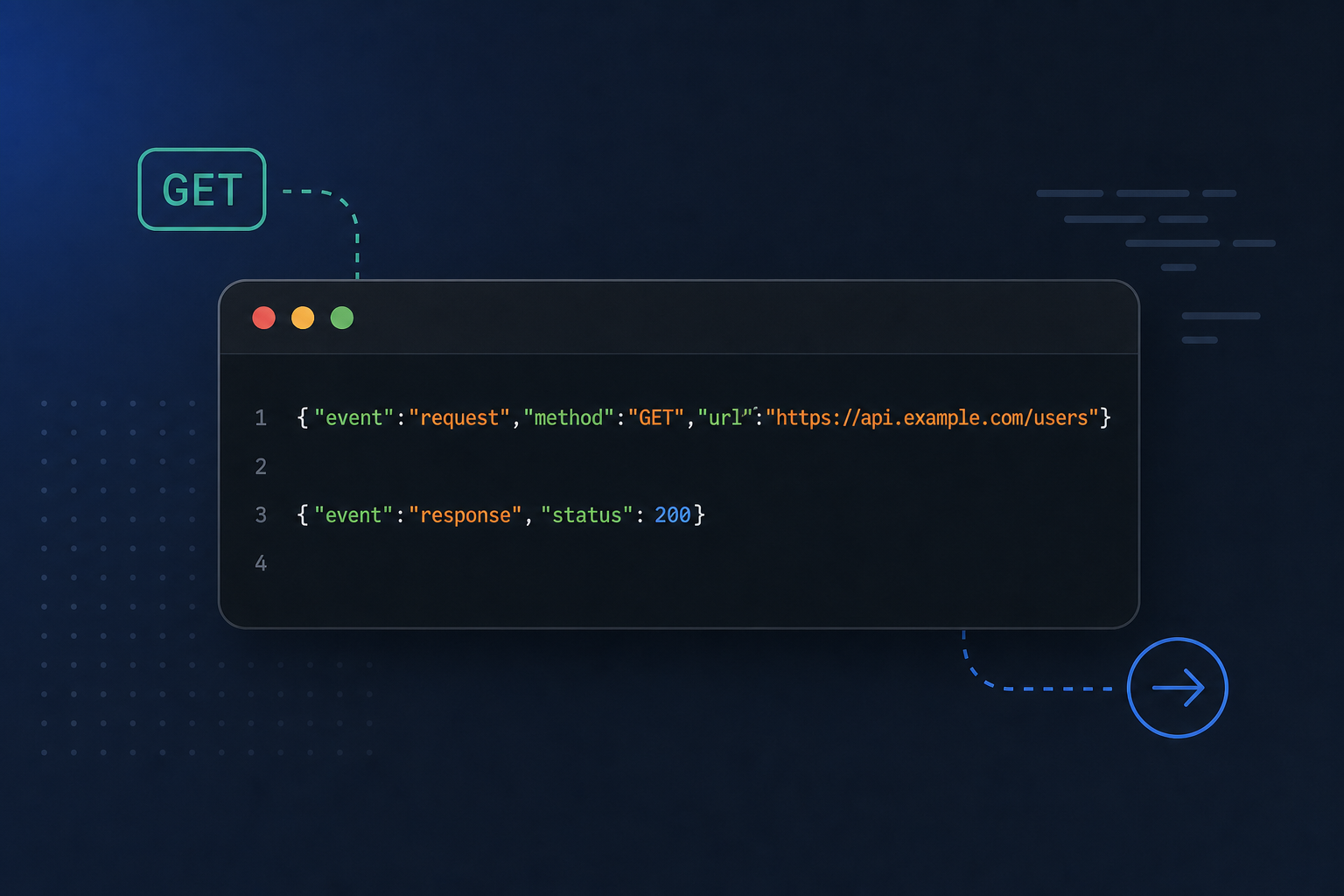
The request editor supports GET, POST, PUT, PATCH, DELETE, HEAD, and OPTIONS. Configure query params, headers, authorization (Basic Auth or Bearer Token), cookies, and body types including JSON, plain text, multipart form, and URL-encoded form data. Use placeholders in URLs, headers, params, and body text — hover any token to preview its resolved value.

Environments are global variable groups you select from the tab bar. Collection variables load first; environment variables override them when both define the same key. That makes it easy to switch between staging and production without duplicating every request.

After you send, the response panel shows status, timing, size, a pretty-printed body, response headers, and test results. A session Console logs every send so you can expand entries and inspect full request and response details without leaving the app.

Scripts and tests

HarborClient runs JavaScript before and after each request, at both the collection and request level. Scripts use the global hc object to modify the outgoing request, set variables, and assert on responses. Post-request tests registered with hc.test appear in the response viewer's Tests tab with pass/fail counts.

If you're coming from Postman, the mental model is similar but the API is different: HarborClient uses hc, not pm. There's no compatibility layer — imported Postman scripts need a quick rewrite. The good news is that common patterns map cleanly: hc.variables.set for session variables, hc.environment.variables.set for persisted environment values, and hc.expect(hc.response.code).to.equal(200) for assertions.

AI assistant

HarborClient includes an optional AI sidebar for working with your API requests. Chat with models from OpenAI, Claude, or Google Gemini using your own API keys — stored locally and encrypted with the OS keychain when available. The assistant can inspect your collections, read responses, query JSON bodies with JMESPath, and even send requests or modify the active tab when you ask it to.

When your team runs HarborClient Team Hub with LLM support enabled, the desktop app can route chat through the hub instead of personal keys. Hub models are labeled accordingly and preferred over personal keys for the same model id.

Getting started

Download the latest release for your platform from GitHub Releases. Installers are available for Windows , macOS, and Linux. Full documentation lives at harborclient.com. The HarborClient blog is at harborclient-blog.com.

HarborClient is open source under the MIT license. If you build or test APIs regularly and want a Postman-style client without the cloud baggage, give it a try — and if you find bugs or have ideas, issues and pull requests are welcome on GitHub.

Webpack Encore with Symfony 3 - headzoo.io

Featured

I decided to give Webpack Encore a whirl while I was building this site, and I thought I would document my experience.

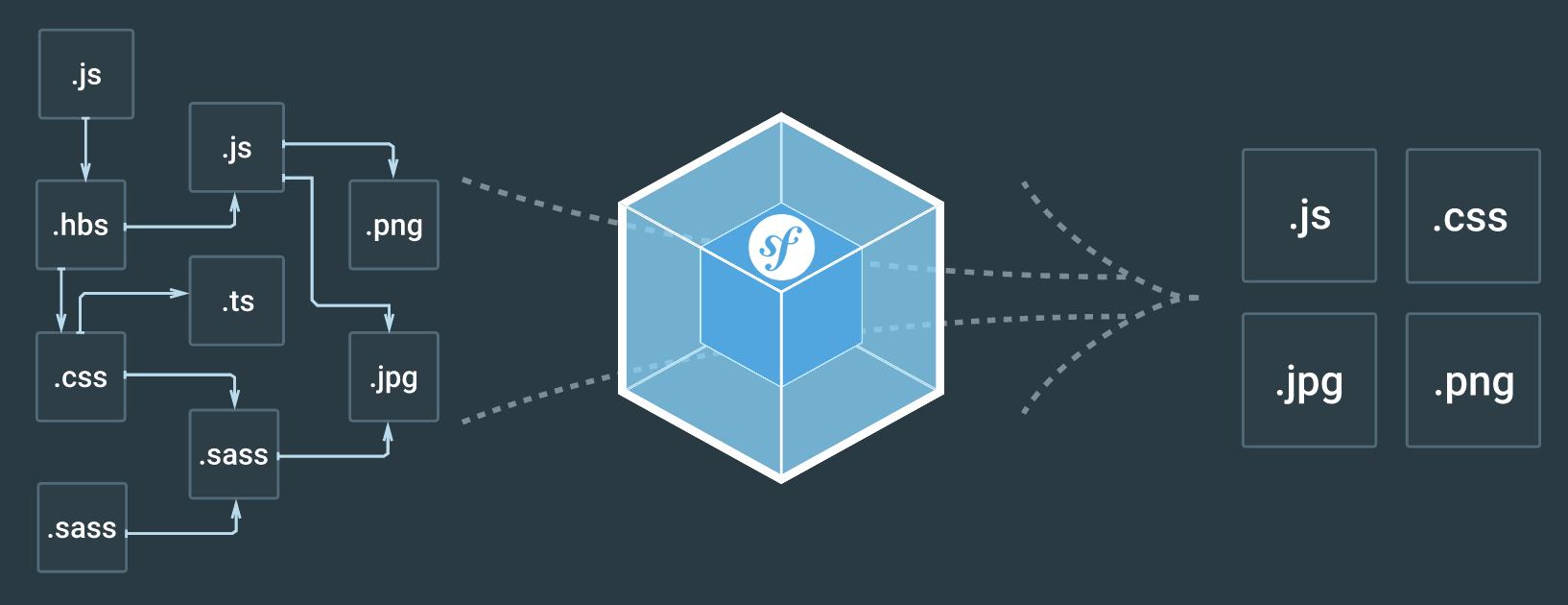
Webpack Encore is a simpler way to integrate Webpack into your application. It wraps Webpack, giving you a clean & powerful API for bundling JavaScript modules, pre-processing CSS & JS and compiling and minifying assets. Encore gives you professional asset system that's a delight to use.

Webpack Encore configures Webpack with sensible defaults, and it also configures Webpack using method calls instead of a JSONish configuration script. You can use it any time you would normally use Webpack, and it also appears to be a replacement for Assetic in Symonfy projects. Which means Symfony developers should get ready to use it.

Configuration

I'm using the following configuration script which I saved in the Symfony project root directory as webpack.config.js.

var Encore  = require('@symfony/webpack-encore');
var webpack = require('webpack');

Encore
.setOutputPath('./web/build/')
.setPublicPath('/build')
.cleanupOutputBeforeBuild()
.addEntry('js/app', './web/src/js/index.jsx')
.addStyleEntry('css/app', './web/src/scss/app.scss')
.enableReactPreset()
.enableSassLoader()
.enablePostCssLoader()
.autoProvidejQuery()
.enableSourceMaps(!Encore.isProduction())
.enableVersioning(Encore.isProduction())
;

let config = Encore.getWebpackConfig();
module.exports = config;

Versioning

Webpack Encore supports versioning assets through the use of a JSON manifest file. Versioning renames the asset files when they change, which forces browsers to re-download them. Webpack Encore and the template asset() function handles everything for you.

The following template:

<!DOCTYPE html>
<html lang="en">
<head>
    <title>headzoo.io</title>
    <meta charset="utf-8">
    <meta content="width=device-width, initial-scale=1" name="viewport">
    <link href="" rel="stylesheet" media="screen">
</head>
<body>
    <div id="mount"></div>
    <script src=""></script>
</body>
</html>

Will render as the following HTML:

<!DOCTYPE html>
<html lang="en">
<head>
    <title>headzoo.io</title>
    <meta charset="utf-8">
    <meta content="width=device-width, initial-scale=1" name="viewport">
    <link href="/build/css/app.0cbc3ec83fb34ac256fba3b70cb78067.css" rel="stylesheet" media="screen">
</head>
<body>
    <div id="mount"></div>
    <script src="/build/js/app.bb3cb705fc87f2a5570e.js"></script>
</body>
</html>

Versioning needs to be enabled in app/config/config.yml.

framework:
  assets:
json_manifest_path: "%kernel.project_dir%/web/build/manifest.json"

Running

During development I run the following command in the PhpStorm terminal to have Webpack Encore to rebuild the js & scss files as they change.

node_modules/.bin/encore dev --watch

To save myself a bit of typing I saved the command in a bash script as bin/encore.

#!/usr/bin/env bash
./node_modules/.bin/encore $@

Which I ran using this command.

bin/encore dev --watch

Conclusion

I give Webpack Encore a solid B+. I found the method calls easier to work with because PhpStorm was able to provide type hints for each possible setting. When using Webpack's own configuration script, I find myself constantly checking the Webpack documentation. Which is a pain.

The Evolution of a Software Engineer - headzoo.io

Featured

The First Year

class HelloWorld
{
public static void main(String args[])
{
// Displays "Hello World!" on the console.
System.out.println("Hello World!");
}
}

The Second Year

/**
* Hello world class
*
* Used to display the phrase "Hello World" in a console.
*
* @author Sean
*/
class HelloWorld
{
/**
* The phrase to display in the console
*/
public static final string PHRASE = "Hello World!";

/**
* Main method
*
* @param args Command line arguments
* @return void
*/
public static void main(String args[])
{
// Display our phrase in the console.
System.out.println(PHRASE);
}
}

The Third Year

/**
* Hello world class
*
* Used to display the phrase "Hello World" in a console.
*
* @author Sean
* @license LGPL
* @version 1.2
* @see System.out.println
* @see README
* @todo Create factory methods
* @link https://github.com/sean/helloworld
*/
class HelloWorld
{
/**
* The default phrase to display in the console
*/
public static final string PHRASE = "Hello World!";

/**
* The phrase to display in the console
*/
private string hello_world = null;

/**
* Constructor
*
* @param hw The phrase to display in the console
*/
public HelloWorld(string hw)
{
hello_world = hw;
}

/**
* Display the phrase "Hello World!" in a console
*
* @return void
*/
public void sayPhrase()
{
// Display our phrase in the console.
System.out.println(hello_world);
}

/**
* Main method
*
* @param args Command line arguments
* @return void
*/
public static void main(String args[])
{
HelloWorld hw = new HelloWorld(PHRASE);
try {
        hw.sayPhrase();
} catch (Exception e) {
        // Do nothing!
}
}
}

The Fifth Year

/**
* Enterprise Hello World class v2.2
*
* Provides an enterprise ready, scalable buisness solution
* for display the phrase "Hello World!" in a console.
*
* IN NO EVENT UNLESS REQUIRED BY APPLICABLE LAW OR AGREED
* TO IN WRITING WILL ANY COPYRIGHT HOLDER, OR ANY OTHER
* PARTY WHO MAY MODIFY AND/OR REDISTRIVUTE THE LIBRARY AS
* PERMITTED ABOVE, BE LIABLE TO YOU FOR DAMAGES, INCLUDING
* ANY GENERAL, SPECIAL, INCIDENTAL OR CONSEQUENTIAL
* DAMAGES ATRISING OUT OF THE USE OR INABILITY TO USE THE
* LIBRAY (INCLUDING BUT LIMITED TO LOSS OF DATA OR
* DATA BEINT RENDERED INACCURATE OR LOSSES SUSTAINED BY
* YOU OR THIRD PARTIES OR A FAILURE OF THE LIBRARY TO
* OPERATE WITH ANY OTHER SOFTWARE), EVEN IF SUCH HOLDER
* OR OTHER PARTY HAS BEEN ADVISED OF THE POSSIBILITY OF
* SUCH DAMAGES.
*
* @author Sean
* @license LGPL
* @version 2.2
* @see System.out.println
* @see README
* @see license.txt
* @todo Test of OS compatibility
* @link https://github.com/sean-inc/helloworld
*/
class HelloWorld
{
/**
* The first phrase
*/
public static final string PHRASE_HELLO = "Hello";

/**
* The second phrase
*/
public static final string PHRASE_WORLD = "World";

/**
* The first word in our phrase
*/
private Word hello = null;

/**
* The second word in our phrase
*/
private Word world = null;

/**
* Constructor
*
* @param hello First word to display in the console
* @param world Second word to display in the console
*/
public HelloWorld(Word hello, Word world)
{
this.hello = hello;
this.world = world;
}

/**
* Display the phrase "Hello World!" in a console
*
* @return void
*/
public void sayPhrase()
{
// Display our phrase in the console.
string first  = this.hello.toString();
string second = this.world.toString();
System.out.println(first + " " + second + "!");
}

/**
* Sets the phrase to use for hello
*
* @param h The first phrase
* @return void
*/
public void setHello(string h)
{
this.hello.setWord(h);
}

/**
* Gets the phrase to use for hello
*
* @return Word
*/
public Word getHello()
{
return this.hello;
}

/**
* Sets the phrase to use for world
*
* @param w The second phrase
* @return void
*/
public void setWorld(string w)
{
this.world.setWord(w);
}

/**
* Gets the phrase to use for world
*
* @return Word
*/
public Word getHello()
{
return this.world;
}

/**
* Main method
*
* @param args Command line arguments
* @return void
*/
public static void main(String args[])
{
// Create a new dic so we can display our phrase on the
// command line.
DIC d = DependencyInjectionContainer::factory();
HelloWorld hw = null;

try {
        hw = d.newInstance(HelloWorld.class);
} catch (DICInstanceException e) {
        System.err.println("There was an error creating an instance of HelloWorld.");
        return;
}

try {
        hw.setHello(PHRASE_HELLO);
        hw.setWorld(PHRASE_WORLD);
        hw.sayPhrase();
} catch (IOException e) {
        System.err.println("There was an IO error.");
} catch (ConsoleException e) {
        System.err.println("There was a console error.");
} catch (Exception e) {
        System.err.println("There was an unknown error.");
}
}
}
<beans xmlns="http://www.framework.org/schema/beans"
xmlns:xsi="http://www.w3.org/2001/XMLSchema-instance"
xsi:schemaLocation="http://www.framework.org/schema/beans
http://www.framework.org/schema/beans/beans-2.5.xsd
http://www.framework.org/schema/context
http://www.framework.org/schema/context/context-2.5.xsd">
<context:annotation-config />
<bean id="HelloWorldBean" class="com.sean-inc">
<property name="hello" value="Word" />
<property name="world" value="Word" />
</bean>
</beans>

The Tenth Year

/**
* Used to display the phrase "Hello World!" in a console
*
* @author Sean
* @see README
*/
class HelloWorld
{
public static void main(String args[])
{
System.out.println("Hello World!");
}
}

Is Programming Art? - headzoo.io

Christopher Pitt asked a simple question: Can a developer be called a creative?

I am talking about whether systems architects or PHP developers (like me!) can be called a creative, even though we predominantly deal with code, and our grasp of colours, layout and iconography is limited to the unicode characters we appropriate for console and log messages.

To be honest it never crossed my mind that programming was anything but a creative pursuit, and I’m happy to call myself an artist to anyone that will listen, but I understand why civilians (non-programmers) could see things differently.

A girlfriend once told me programming “looks boring” when I suggested learning a bit of JavaScript and HTML, and many years ago I was roommates with a painter, who, on hearing me proclaim my code was artwork, replied with a condescending, “Yeah, uh huh, sure!”

Yes, I get it. To the casual observer it may appear terribly dreary staring at a monitor all day and night, with the steady drone of click, click, click coming from a keyboard, and I understand why a classic artist (writer, painter, musician) may scoff at the idea of programming as an art form. No one is going to look at my finished work in a gallery, and discuss the artist’s soul while sipping expensive wine.

What people don’t see is the explosion of activity happening in my head while I stare at those bright monitors with my bloodshot eyes. I’ve never surfed the waves of Hawaii, but I get an adrenaline rush from conquering problems. I’ve never played a hit single to a crowed of adoring fans — and certainly never had a hot groupie throw their bra at me — but I know the feeling of being taken to a higher conscience level when I get into a groove.

I know passion and excitement, and I know what it’s like to feel drained, exhausted, high, and elated when a project is finished. Most importantly though, I know how nerve-racking it can be to finally give my work to the world. Will people love it or hate it? Will people understand and appreciate the nuance of my work, or will they think it’s boring and stupid?

Make no mistake about it, programming is a creative pursuit, and I am an artist. I may work with a keyboard and IDE instead of a paint brush or guitar, but I have the same passion and dreams as an artist, and I live and die by the acceptance or rejection of my work by fans. My work may never be seen in a Soho art gallery, but it will be seen by millions of people.

Heck, I even occasionally sit back and admire my code while sipping expensive wine.

Slow Is Smooth; Smooth Is Fast - headzoo.io

Featured

I grew up being a big fan of horror movies. I enjoyed them all; from big blockbuster movies, to unheard of indie flicks, and there's one type of scene all horror movies have in common: The young heroine manages to escape from the masked killer's dungeon, and breathlessly makes back to her car. After fidgeting with her keys for what seems like an eternity, she finally gets the door open. She's almost home free! After spending another minute panicking and dropping the keys on the floor, she finally gets the right key into the ignition. But it's too late! All the time she wasted fidgeting with the car keys gave the killer a chance to catch up to her, and just as she's about to start the car and drive off to safety, the killer pulls her out of the driver side window kicking and screaming. She almost made it! She would have made it too had she remembered this:

Slow is smooth; smooth is fast

Or to put that in more familiar words, haste makes waste. The concept is simple: the faster you move while completing a task, the more mistakes you make, and the longer the task ultimately takes. On the other hand taking your time means fewer mistakes, which means you will get things done faster. The concept almost seems counter intuitive; Going slow and taking your time means tasks are finished quicker. Our horror movie maiden would have escaped the killer had she gone slower and not made so many mistakes.

Programmers are infamous for pulling all night coding sessions fueled by coffee and mountain dew. When I was young I could easily write a thousand lines of code in a single sitting, and dammit, it was fun! But there was one little problem: the code I wrote was total crap. It was unreadable, undocumented, untested, unmaintainable, and worst of all it was full of logic errors. The types of logic errors I could have avoided had I not been mentally traveling at warp speed. The time I gained on the front-end by writing my code so quickly, was lost on the back-end having to fix and rewrite it. Any happiness my clients felt from having their website finished in record time quickly evaporated when it crashed.

Slow down. Take your time. Remember to stay focused on the task at hand. Engineering requires continuous critical thinking. Rushing through a task on mental autopilot leads to mistakes, and the final code will be unorganized, unfocused, and bloated. Taking your time to do things right the first time is the difference between 40 lines of loops and if…then spaghetti code, and 10 lines of easy to maintain engineering excellence.