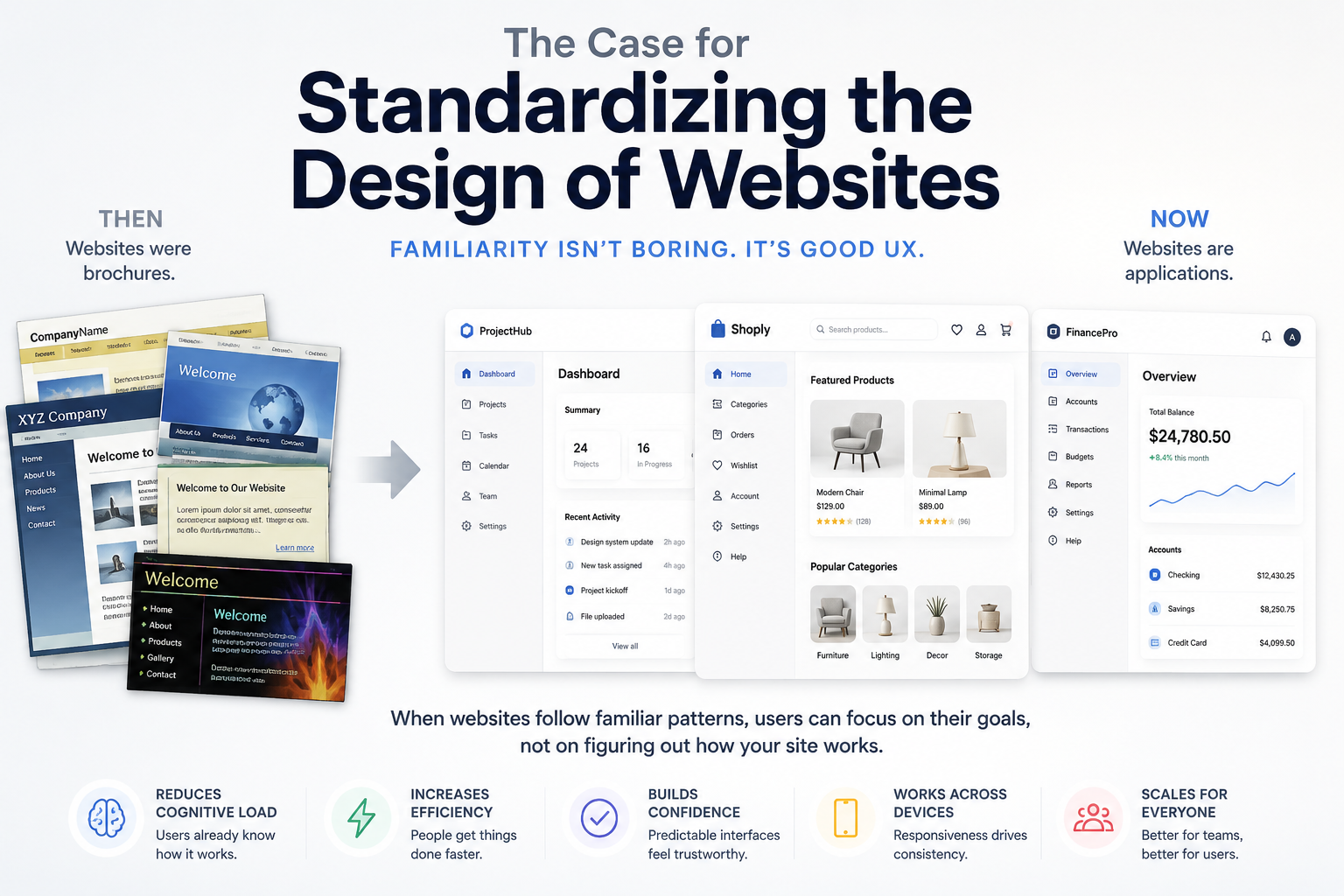
People complain that websites are all starting to look the same.
They are not entirely wrong. A lot of modern websites do look similar. They have familiar navigation bars, predictable layouts, large hero sections, cards, sidebars, dashboards, tabs, search boxes, profile menus, settings pages, and responsive grids. Buttons look like buttons. Forms look like forms. Menus behave like menus.
But I would argue that this is mostly a good thing.
Software is supposed to feel familiar.
A website is not a painting. It is not a sculpture. It is not a brand mood board. At least not primarily. A website is usually a tool that someone is trying to use to accomplish something. They want to read, buy, search, compare, book, configure, publish, message, upload, download, schedule, manage, or solve a problem.
And when people are trying to get something done, originality is not always a virtue.
Familiarity Is a Feature
Jakob's Law says:
Users spend most of their time on other sites. This means that users prefer your site to work the same way as all the other sites they already know.
That one idea explains a huge amount of good interface design.
Users do not arrive at your website as blank slates. They bring expectations from every other website and app they have used. They expect the logo to link home. They expect navigation to be near the top or side. They expect search to look like search. They expect account settings under an avatar or profile menu. They expect destructive actions to require confirmation. They expect forms to validate in familiar ways. They expect mobile navigation to collapse into a menu.
When your site follows those expectations, users can spend their mental energy on the task instead of the interface.
That is the point.
Good design reduces cognitive load. It does not force users to relearn basic interaction patterns just because a company wanted to look different.
Different Is Not Automatically Better
There is a common mistake in web design: confusing distinctiveness with quality.
A site can be visually unique and still be frustrating to use. It can be memorable for all the wrong reasons. It can win design awards while annoying the actual people who need to navigate it.
Novelty has a cost. Every unusual layout, hidden interaction, custom scroll behavior, strange menu, or clever visual metaphor asks the user to stop and figure out what is going on.
Sometimes that cost is worth paying. Most of the time, it is not.
If you are building a portfolio, an art project, a game, an interactive story, or a highly expressive brand experience, originality may be the product. In those cases, the interface itself is part of the message.
But most websites are not that.
Most websites are closer to software. They exist to help users do something. And software benefits from conventions.
Nobody complains that every desktop app has menus, windows, buttons, scrollbars, keyboard shortcuts, and settings screens. Nobody wants each text editor to invent a new way to save a file. Nobody wants every checkout flow to completely reinvent how payment forms work.
We understand this in software. We should understand it on the web too.
The Early Web Was More Like a Brochure
Part of the reason people expect websites to look different is historical.
In the early days of the web, most websites were not really applications. They had very little functionality. A company website was often a digital brochure: a homepage, an about page, a contact page, maybe a product page, maybe some animated graphics, maybe a guestbook if things got wild.
The web was a publishing medium first. It was closer to a magazine rack than an app store.
So companies treated websites like marketing materials. The goal was to express the brand. Be memorable. Look different. Show personality. Stand out from competitors.
That made sense at the time.
But the web changed.
Today, websites are often full applications. Banking, email, project management, analytics, design tools, developer tools, ecommerce, healthcare portals, tax software, maps, calendars, document editors, CRMs, dashboards, admin panels, and social platforms all run in the browser.
From a user experience standpoint, these things should not behave like brochures. They should behave like software.
And software works best when users can transfer knowledge from one tool to another.
Standardization Helps Users Move Faster
When websites share common design patterns, users get faster.
They know where to look. They know what to click. They know what will happen next. They can predict the system. That predictability creates confidence.
This is especially important for functional websites. A developer using an API dashboard does not want to decode an experimental interface. A shopper checking out does not want to hunt for the cart. A patient using a medical portal does not want a creative navigation system. A small business owner using accounting software does not want the invoice editor to be a visual puzzle.
They want clarity.
Standard layouts are not lazy. They are respectful.
They tell the user, "You already know how this works."
That is powerful.
Responsiveness Pushes Designs Toward Similarity
There is another practical reason websites are starting to look alike: responsive design.
A modern website has to work on large desktop monitors, laptops, tablets, foldables, and phones. It has to handle different screen widths, input methods, font sizes, accessibility settings, and network conditions.
That naturally pushes designers toward patterns that survive across contexts.
A three-column desktop layout becomes a single-column mobile layout. Navigation collapses. Cards stack. Tables become lists. Buttons become full-width. Sidebars move behind menus. Content is broken into modular sections. Interfaces become more grid-based and component-driven.
Once you design for responsiveness, some choices become obvious because they are durable.
Cards are popular because they adapt well. Navigation bars are popular because users understand them. Responsive grids are popular because they scale. Reusable components are popular because they keep interfaces consistent across pages and devices.
The more screens a site has to support, the more valuable consistency becomes.
A wildly unique desktop design may look impressive in a mockup. Then it falls apart on a phone.
Design Systems Are a Sign of Maturity
The rise of design systems also contributes to this similarity.
That is not a bad thing.
Design systems exist because teams eventually learn that inventing every screen from scratch is a waste of time. It creates inconsistency, slows development, increases bugs, and makes products harder to maintain.
A good design system gives teams a shared language: buttons, forms, modals, alerts, cards, tables, menus, typography, spacing, colors, and interaction rules. Instead of debating every detail on every page, teams can focus on the actual product.
This is how mature software gets built.
Developers already understand this idea. We reuse libraries, frameworks, components, APIs, database conventions, command-line patterns, and project structures. We do not write everything from scratch just to prove we are creative.
Interface design should be treated the same way.
Consistency is not the enemy of creativity. It is what lets creativity be spent where it matters.
Branding Still Matters
None of this means every website should be identical.
Branding still matters. Personality still matters. Visual polish still matters. Tone, illustration, motion, color, copy, imagery, and small interaction details can all make a site feel distinct.
But those things should sit on top of a usable foundation.
A brand should not make the navigation confusing. It should not make forms harder to complete. It should not hide important actions. It should not replace clear labels with clever language. It should not force users to learn a brand-new interface model for no good reason.
The best websites are familiar in structure and distinct in character.
They work the way users expect, but still feel like they belong to a specific company or product.
That is the balance.
Standardization Is Not Boring. It Is Useful.
A lot of complaints about websites looking the same come from people who spend a lot of time looking at websites as objects.
Designers look at websites. Developers look at websites. Marketers look at websites. Founders look at competitors' websites. We notice patterns. We get bored. We want something fresh.
But users are not usually studying websites as creative artifacts.
They are trying to get something done.
For them, sameness can be a relief. Familiarity means less thinking, fewer mistakes, faster decisions, and lower frustration.
That is not boring. That is good design.
The web has grown up. Websites are no longer just digital brochures. They are tools, workspaces, stores, dashboards, editors, communication systems, and applications.
And applications should be predictable.
So yes, many websites are starting to look the same.
Good.
That means the web is slowly learning what software has known all along: users do not want every tool to be a new adventure. They want it to work.


